
Verizon Benefits Connection Login For Retirees: Pension & Health Benefits

POINTS
-
Verizon Communications Benefits Connection = your retiree benefits hub (pension, health, details)
-
Use only the official portal (via Fidelity Investments) to stay safe
-
Login needs User ID + password + 2FA code
-
Most issues = wrong info, browser errors, or expired codes
-
Reset password/User ID easily with self-service tools
-
Fidelity NetBenefits ≠ Benefits Connection (investments vs retiree benefits)
How Long Will $1.2 Million Last In Retirement?
Wondering if $1.2 million is enough to retire on? See how long it could last based on your spending, retirement age, and income needs, and what could change the outcome.
Open CalculatorIf you’re a Verizon retiree, most of your benefits, from pension payments to insurance coverage, are managed in one place: the Verizon BenefitsConnection portal.
Think of it as your central dashboard. It’s the same system used by active employees, but tailored to retirees managing post-employment benefits.
Verizon Retiree Benefits Calculator
Official Portal Access
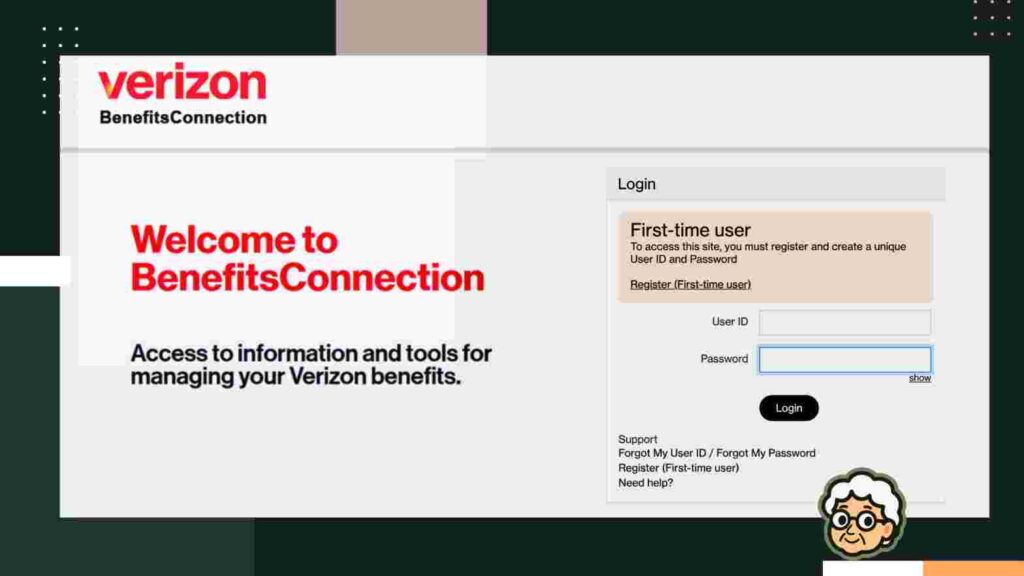
This portal is strictly for benefits, not wireless billing or general Verizon account management.
Once you land on the portal, you’ll find:
- “Forgot User ID” and “Forgot Password” links
- A “Register (First-time user)” option
- The Verizon Benefits Center helpline: 855-489-2367
If you run into trouble, stick to these official tools. Avoid third-party sites or sharing your credentials elsewhere.
Step-by-Step: How Retirees Log In
Logging in is straightforward once your account is set up.
1. Go to the portal
Open your browser and visit the official BenefitsConnection page.
2. Register if you’re new
First-time users need to click “Register (First-time user)”.
Retirees will typically:
- Enter their Social Security Number
- Create a User ID and password
(Active employees use an employee ID instead.)
3. Create your login credentials
Follow the prompts to:
- Choose a username
- Set a strong password
Once complete, the system confirms your registration.
4. Log in
Return to the login page, enter your credentials, and click Login.
If everything matches, you’ll land on your benefits dashboard.
First-Time Login Setup for Retirees
Your first login involves a bit more setup than usual.
The system may:
- Ask additional personal questions
- Send a verification code via email or phone
This is part of standard security (multi-factor authentication).
Use a strong, unique password, ideally something you don’t reuse elsewhere. Verizon won’t send you your password later, so store it safely.
How to Reset Your BenefitsConnection Password
Forgetting login details is common and easy to fix.
Resetting your password
- Click “Forgot My Password”
- Follow the prompts
- Use the reset link or code sent to your email
Once complete, you’ll be asked to log in again with your new password.
Recovering your User ID
- Click “Forgot My User ID”
- Enter your identifying details
- Check your email for your username
If you don’t receive the reset email, check your spam/junk folder.
The system warns users: “Your User ID was sent to the Email Address on file… You might have to check your Junk E-mail folder…”
Common Login Issues (and Why They Happen)
Even when everything looks right, login problems can still pop up.
How to Fix Verizon BenefitsConnection Login Problems
If you’re stuck, a few simple fixes often solve the issue.
- Clear your browser’s cache and cookies
- Update your browser (Chrome, Edge, or Firefox)
- Switch devices or networks
Still not working?
Two-Factor Authentication (2FA) Issues Explained
Many accounts now require an extra step after entering your password.
With 2FA, you’ll receive a code via:
- Text message
- Authenticator app
What You Can Do After Logging In
Once inside, the portal becomes your control center.
What BenefitsConnection Covers (and What It Doesn’t)
What to Do If You’re Locked Out Completely
Because this portal contains sensitive information, security matters.
If your account becomes locked (e.g., after 5 wrong passwords), follow these steps:
Always use the official support number. Avoid random “tech support” calls or links, as those could be scams.
FAQs
Can I use this portal on my phone or tablet?
Yes. BenefitsConnection is mobile-friendly, so you can log in from a smartphone or tablet browser the same way you would on a computer.
Is this only for current employees?
No. Retirees and some separated employees can still access it, depending on plan eligibility. Former employees usually use a retiree login tied to their SSN-based credentials.
What if I can’t log in even after resetting my password?
Check that your username is correct, then use the Forgot User ID or Password links. If you are still locked out, contact the Benefits Center for help.
When do I need to update my benefits elections?
Usually during annual open enrollment or after a qualifying life event, such as marriage or loss of coverage. Outside those windows, changes are generally limited.
Why does it ask for MyVerizon info?
If you also have Verizon wireless service, the portal may route you through MyVerizon for identity verification. Retirees still usually access BenefitsConnection with retiree credentials tied to their SSN.



Thanks