How to Activate Cash App Card: 3 Easy Ways (QR Code, CVV & App Guide)

A Cash App Card requires activation before it can be used for purchases and other card transactions.
Once your card is activated, it links the physical card to the user’s Cash App account and enables the card’s payment functionality.
After activating, you can use the card for everyday spending.
Can You Add a Mastercard Gift Card to Cash App? Find Out
How to Activate a Cash App Card
| Method | Required Inputs | Typical Time / Success Rate (≈) |
|---|---|---|
| QR Code Scan | QR code on card packaging + camera | Instant (<1 min) ≥99% — Automatic matching |
| Manual Entry | Card number, CVV, expiration date | 1–2 min ≈95%+ — Depends on correct entry |
Method 1: Activate Cash App Card With QR Code (Recommended)
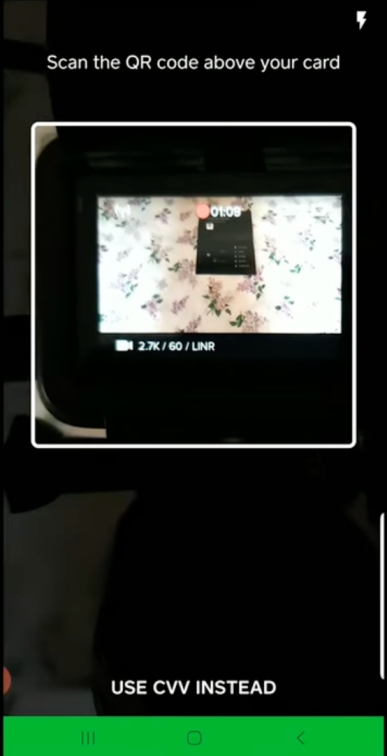
You first need to have the physical card and mailer in hand.
- Open Cash App
- Tap the Cash Card icon, usually at the bottom of the home screen
- Enter the Cash Card section
- Tap Activate Cash Card.
- When prompted, allow the app to use your camera.
- Position the phone so it scans the QR code that came with your card.
The app will read the code and automatically activate the card.
Once activated, you can immediately use the card for in-store purchases, online payments, and ATM withdrawals, subject to your available balance and applicable limits.
Method 2: Activate Cash App Card Without QR Code
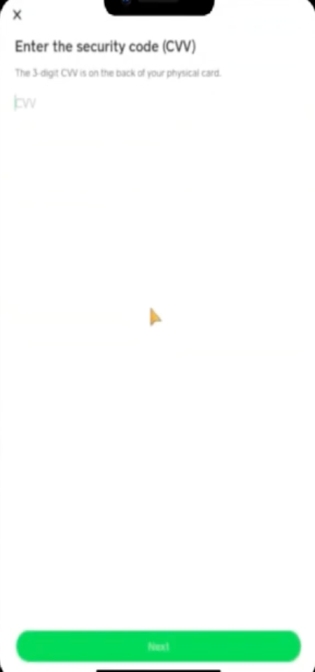
If your QR code is missing or unreadable, you need to use the app’s manual activation flow.
- Open Cash App
- Tap the Cash Card icon, usually at the bottom of the home screen
- Enter the Cash Card section
- Tap Activate Cash Card.
- Choose Use CVV Instead (sometimes labeled Activate without QR code in older app versions).
- Enter your card details (3‑digit CVV from the back of the card, thep expiration date, and any other requested information)
- Click submit.
Cash App will verify the details and activate the card immediately.
But, if you do not have access to a virtual card, Cash App generally requires the physical card and its details to complete activation.
In that situation, you won’t be able to activate the card until you receive a replacement.
Can You Activate Cash Card Offline/Phone Activation?
No, there is no dedicated offline or automated phone activation system for Cash App Cards.
Activation must be done through the mobile app with internet access. But if you need any help, you can contact support.
1-800-969-1940
cash.app/help
Open Cash App → Tap your profile icon → Select Support → Choose Chat or your issue topic
Cash App
1955 Broadway, Suite 600, MSC 211
Oakland, CA 94612
What Do You Need to Activate Cash App Card?
- QR Method: No data entry is needed beyond granting camera access to scan the code.
- Manual Method: You will need the CVV security code (3 digits on back of card) and the card’s expiration date.
In most cases, the app may auto-fill your card number, but if prompted, enter the full card number as printed.
Some users also find it necessary to verify their address or billing ZIP if prompted.
But, before you can order a Cash App Card, Cash App typically requires identity verification, including your full name, date of birth, and the last four digits of your Social Security number. Once your identity has been verified, you can activate your card without providing your full SSN again.
Activation Timeline for Cash Card
Here’s a quick overview of card delivery, activation timing, success rates, and common issues.
| Topic | Details |
|---|---|
| Card delivery | Arrives in approximately 7–10 business days after ordering. |
| Activation time | Usually activates within seconds after QR scan or CVV/details submission. Manual entry may take 1–2 minutes. |
| Activation success | Both QR scanning and manual entry have a very high success rate when details are correct. |
| QR activation | Works instantly in most cases when the QR code is clear and the camera works properly. |
| Manual activation | Successful when card details match exactly. |
| Common issues | Typos, connectivity problems, damaged QR codes, or temporary app issues. |
If activation doesn’t complete successfully, check your details, connection, and app version before trying again.
Troubleshooting Checklist
If activation fails or errors appear, you can work through these fixes systematically:
If the issue persists after trying these solutions, consider contacting Cash App Support for further assistance.
Cash App Card Activation FAQs
Cash App Card activation is usually instant. Once you scan the QR code or enter the card details, you can use the card immediately.
Yes. You can activate your card on any device as long as you sign in to the same Cash App account.
No. You need the card’s QR code or card details to complete activation. There is no offline activation option.
Activate the replacement card through the Cash Card section in the app. The old card will be deactivated after the new one is activated.
Activation issues may happen because of an outdated app, connection problems, incorrect card details, or account verification issues. Updating the app and retrying usually resolves common problems.
Yes. Cash App does not charge a fee to activate your card. Activation is completed through the app and does not require your PIN, password, or full card number.
Use the Support section inside the Cash App for help. Avoid unofficial support numbers or services that ask for sensitive account information.
No. You need the physical card to complete activation. If available, you may still use a virtual card for eligible online purchases before delivery.
You can use the Cash App Help Center or in-app support for additional Cash Card questions and troubleshooting.
References: