What Is Pool on Cash App? How It Works, Features & Setup Guide

POINTS
-
Cash App Pools let multiple people contribute to a shared goal.
-
Create a pool with a title, funding goal, and optional deadline.
-
Invite contributors using a shareable link or QR code.
-
Funds collected are deposited into your Cash App balance.
-
Pools are ideal for group gifts, trips, events, and fundraisers.
-
Track contributions in real time and close the pool when you’re finished.
Group payments often create extra steps, especially when one person pays first and collects money later.
Cash App introduced Pools to support shared expenses within the app instead of relying on separate payment requests and reimbursements.
The feature keeps pooled funds separate from a user’s Cash App balance until the organiser closes the pool and transfers the money.
How Long Does a Cash App Dispute Take? See the Timeline
What Is Pool on Cash App?
Cash App Pools is a group payment tool built into Cash App for collecting money toward a shared goal.
Rather than one person fronting all costs, Pools lets an organizer set up a pot that friends and family can chip into ahead of time.
The organizer names the pool (e.g., Group Vacation or Birthday Gift), specifies a target amount, and invites others.
How Cash App Pools Work?
Here’s how Cash App Pools operate:
- An organizer creates a pool in the app’s Payments tab
- They assign a name and funding target to describe the goal.
- The organizer then invites contributors by adding Cash App contacts via $Cashtag or by sharing a generated link.
- Invitees follow the link or tap the invitation inside Cash App to contribute money.
Once the contribution is submitted, Cash App treats it as a payment to the fundraiser organizer. The transfer is generally final, and the funds immediately become available to the organizer.
All contributions are visible to pool members.
Cash App displays how much each person has paid toward the goal.
The money remains separate from Sarah’s regular Cash App balance, making it easy for everyone to track the pool’s progress within the app
Once the fundraising goal is reached, or whenever Sarah decides to end the collection, she closes the pool. All of the pooled funds are then transferred directly to her Cash App balance, where they can be spent, sent, or used with the Cash App Card like any other available balance.
Can You Use Cash App Pools For All Events?
No. Cash App Pools cannot be used for every reason.
Cash App Pools are designed for personal group contributions toward a specific purpose.
They are not a general fundraising tool, business payment system, or investment pool.
Can Use Cash App Pools For
- Group gifts
- Birthday celebrations
- Shared meals or dinners
- Vacation costs
- Group trips
- Event tickets
- Wedding gifts
- Personal group expenses
- Friends or family activities
- Other personal uses with a clear purpose
Cannot Use Cash App Pools For
- Charity fundraising
- Selling products
- Selling services
- Business expenses
- Political campaigns
- Political causes or candidates
- Investments
- Cryptocurrency investments
- Loans or lending money
- Collecting money for a minor without guardian permission
- Illegal activities
- Misleading or false purposes
You also need to describe the purpose accurately and use the money for the stated purpose of the Pool.
How to Create a Cash App Pool?
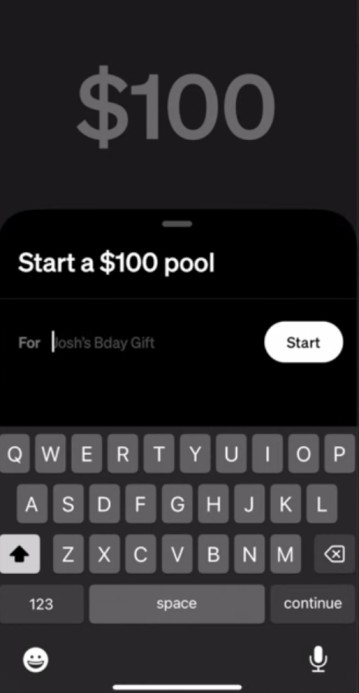
To create a pool in Cash App:
- Open Cash App
- Go to the $ Payments tab
- Select the Pools option (often shown as a separate menu item or under a + button).
- Tap Create Pool
- Enter a name/description and a target amount for the pool.
- Press Next or Continue.
You can also tap Share Link to generate a payment link that lets people contribute using Apple Pay or Google Pay. Once you’ve confirmed the details, the Pool will be created and ready to accept contributions.
Once created, your pool appears in your list of active pools.
The organizer will see a summary screen showing the
- Pool name
- Target amount, and
- Current total collected so far.
Can you edit Cash App Pool Name?
You can edit the name/goal here until it’s finalized.
The pool remains open until you choose to close it.
How to Invite Contributors to Your Pool?
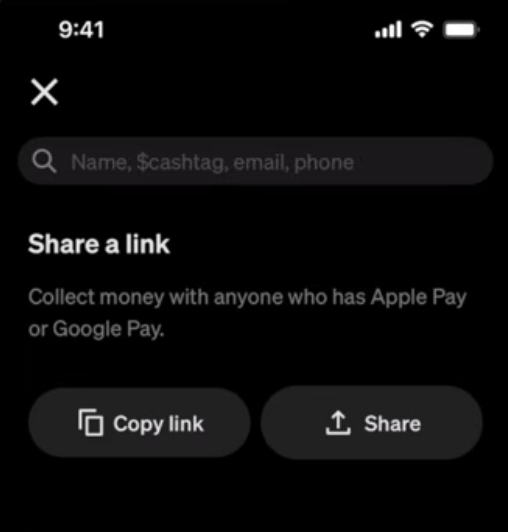
Inviting people to your pool is super easy.
If they already use Cash App, you can add them directly by selecting their $Cashtag or contact in the app. Cash App will send them an in-app notification of the pool invite.
For people not on Cash App, tap Share Link to copy or message the pool’s unique URL.
This link lets anyone with Apple Pay or Google Pay on their phone contribute without opening Cash App.
All invited contributors retain the ability to contribute until the pool is closed; there are no additional permission hurdles.
Contributors can be invited through the Cash App using their $Cashtag, phone number, or email address, or by sending the Pool link through any messaging platform.
Track Progress on the Pool
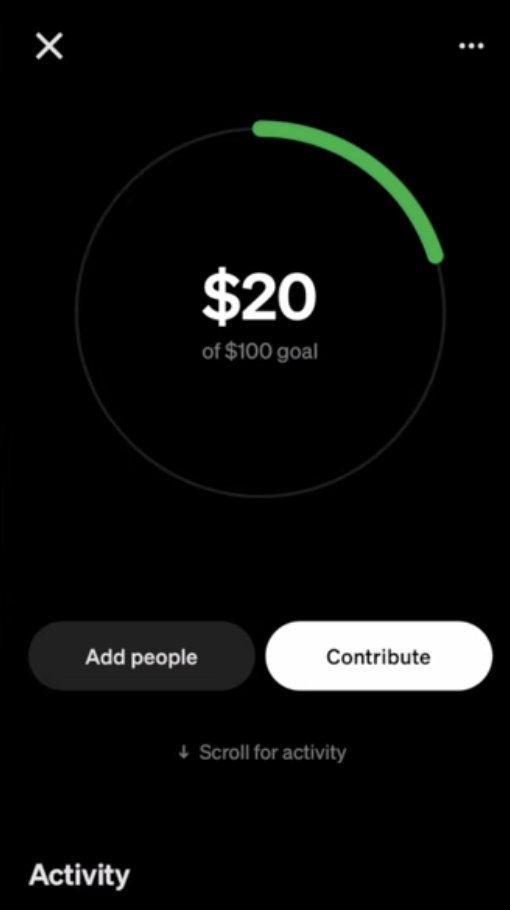
As contributions come in, Cash App automatically updates the pool’s progress in real time.
The organizer and invited members can open the pool in the app and see a progress bar or status indicator and a list of who has contributed and how much.
The app shows each participant’s name and amount.
Is there an expiration date on the Pool?
There is no expiration date on a pool.
It remains open for new contributions until the organizer closes it.
You can check the pool status anytime in the Payments tab.
How to Close the Pool?
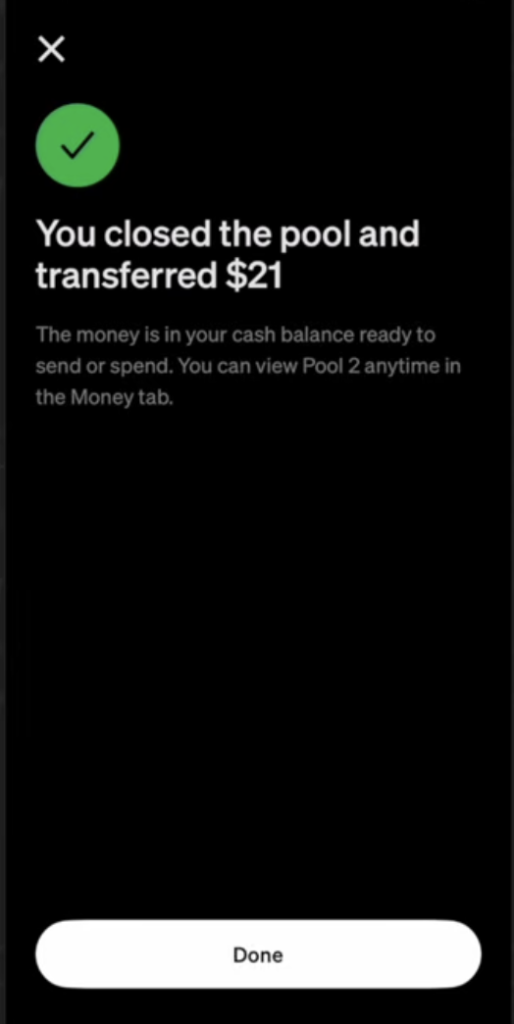
When your goal is met, or you simply want to stop collecting, the organizer can tap Close Pool in the Cash App interface.
Closing is done entirely by the organizer; contributors cannot close the pool.
You can close a pool at any time, even if the funding goal wasn’t reached.
Upon closing, Cash App instantly transfers the funds to the organizer’s Cash App balance.
For example, you can make purchases with your Cash App Card, pay using Cash App Pay, or send money to other Cash App users as needed.
Who Can Contribute to a Pool?
- Cash App users
- Friends and family members
- People invited through a Pool link
- People without a Cash App account (using Apple Pay or Google Pay)
- Group members contributing toward a shared personal goal
- Eligible contributors who meet Cash App requirements
Can You Spend Money Directly From a Pool?
No, pooled funds cannot be spent or moved until the pool is closed.
As long as the pool is open, its money sits in a separate bucket.
The organizer must close the pool to unlock the funds.
Only then does the total collected transfer into the organizer’s Cash App balance, where it becomes available for spending or sending.
This design prevents accidental use of the funds for the wrong purpose.
Fees and Limitations
Cash App Pools itself has no special subscription fee; however, individual transactions follow Cash App’s normal fees:
| Topic | Simple Explanation |
|---|---|
| Creating a Pool | Free. Creating a Cash App Pool is free. There is no setup fee. |
| Adding Money with Cash App Balance | Free. You can add money using your Cash App balance without extra charges. |
| Adding Money with Debit Card | Free. Using a linked debit card does not add a fee. |
| Adding Money with Credit Card | A 3% fee is charged when you use a credit card. |
| Who Can Create a Pool? | The person creating the Pool usually needs to verify their identity with Cash App. |
| Limits | Cash App limits still apply. Cash App may also set extra limits on large Pools or many Pool activities. |
| Getting Your Money | Money added to the Pool goes to the organizer’s Cash App account. Processing times may vary depending on the payment method. |
| Refunds | Once someone contributes money, they usually cannot get an automatic refund from Cash App. They must work it out with the organizer. |
| Trust and Safety | Only contribute to Pools created by people you trust. Cash App does not check how the organizer uses the money. |
| Allowed Uses | Pools are meant for personal collections between people. |
| Not Allowed | Pools cannot be used for businesses, selling products, charity fundraising, political fundraising, loans, or investments. |
Aside from the standard 3% credit-card fee, Cash App Pools are effectively free to use.
Just remember that the organizer should be trusted, as refunds are not handled by Cash App, and that Cash App may limit unusually large pools or contributions without warning.
Cash App Pools FAQ
No. Contributors can use a shared pool link and pay with Apple Pay or Google Pay. New York residents must have a Cash App account to participate.
No fees apply for contributions made with a Cash App balance or linked debit card. Credit card contributions include a 3% fee.
No. Pool funds cannot be used until the organizer closes the pool and transfers the money to their Cash App balance.
No. Pools remain open until the organizer closes them. The organizer can close a pool even if the goal has not been reached.
Yes. Pool participants can see contributor names and contribution amounts.
The organizer can still close the pool and receive all collected funds. No additional contributions can be made after closing.
Refunds depend on the organizer. Cash App does not automatically reverse pool contributions, so contributors should only pay people they trust.
Cash App users who meet eligibility requirements can create and manage pools. Pools are currently available only in the U.S.
Contributors can use a Cash App balance, eligible debit cards, or supported digital wallet payments. Credit cards may be used with a 3% fee, while gift cards are not supported.
No. Pools cannot be canceled to automatically return funds. The organizer can only close the pool and transfer the balance to their Cash App account.
References: